
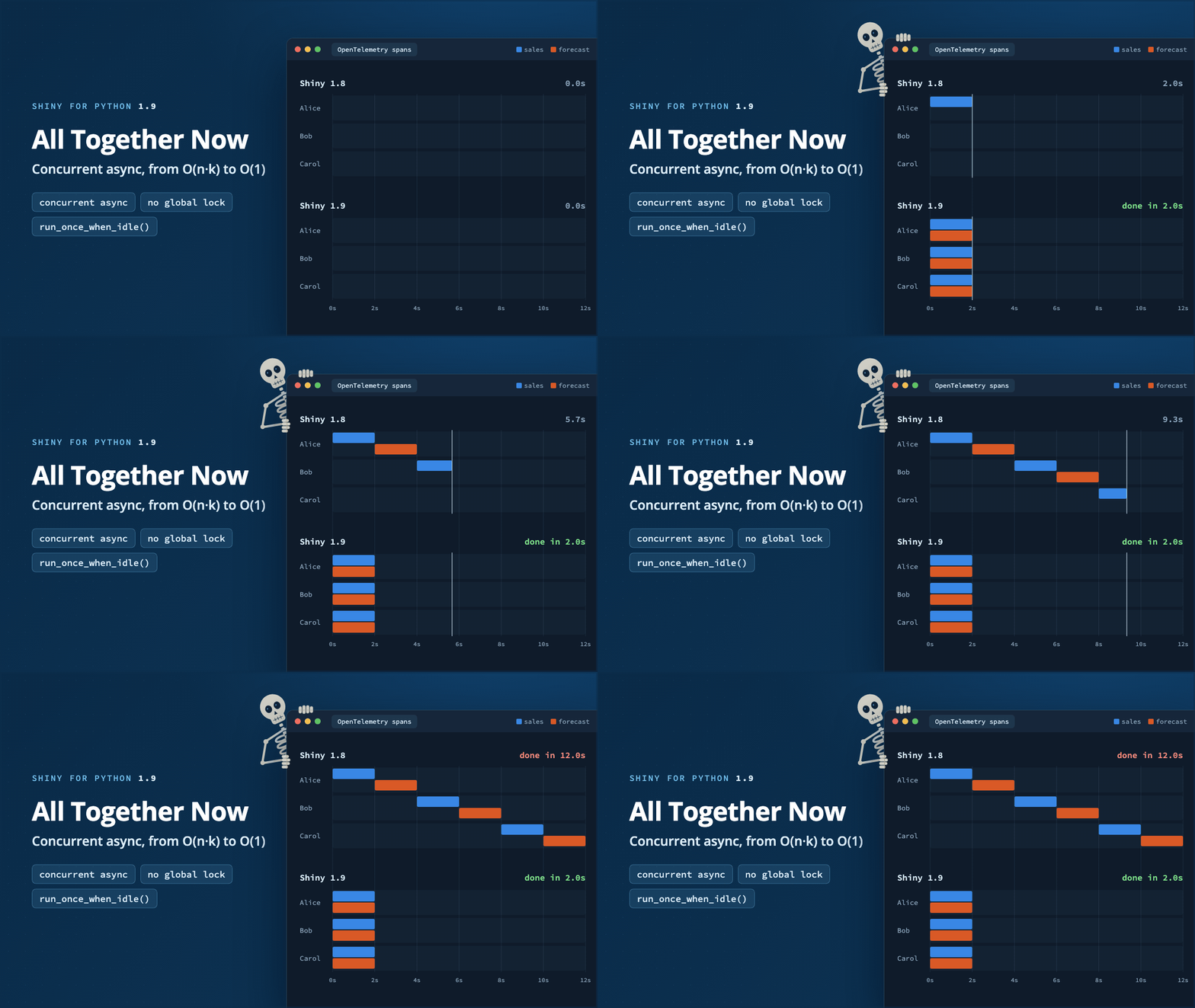


Shiny for Python 1.9 overhauls how the reactive system runs async code, and now uses a concurrency model similar to Shiny for R. This post explains what changed, and shows how much faster an app gets when it awaits slow work. The key changes:
- A slow
awaitin one session no longer blocks other sessions, so individual users of an app no longer wait for each other. - Async outputs in the same session now run concurrently, so a page’s slow outputs run in parallel rather than serially.
reactive.lock()is deprecated, and the newsession.run_once_when_idle()provides a way to change reactive state from a background task.
These changes only affect async code. Your app still runs on one thread with a single asyncio event loop, and synchronous
code still blocks other sessions (see Concurrency needs await). The difference is that an async
task now waits for slow work without blocking other tasks, in its own session or in others.
Before 1.9, one lock for the whole process serialized all reactive updates. The lock made sure that an input could not change while an output that read it was still computing. In 1.9, the lock is gone, and instead each session sends its outputs before it applies that user’s next input, the same model as Shiny for R. Within that rule, the reactive system starts each effect as its own task and moves on. While one session awaits a query, the event loop is free to run other tasks, making the app more responsive for everyone.
One slow user no longer blocks everyone#
Until now, Shiny for Python processed reactivity behind one lock for the whole process, reactive.lock(). When a user’s action invalidated an effect or an output, Shiny took the lock, ran everything that was invalidated, and released the lock only when all of it had finished. This model meant that any other reactive effects were blocked for as long as an operation kept the lock. During that time, no other session in the process (e.g., a separate tab or another user) could update anything, not even an output that had nothing to do with the query.
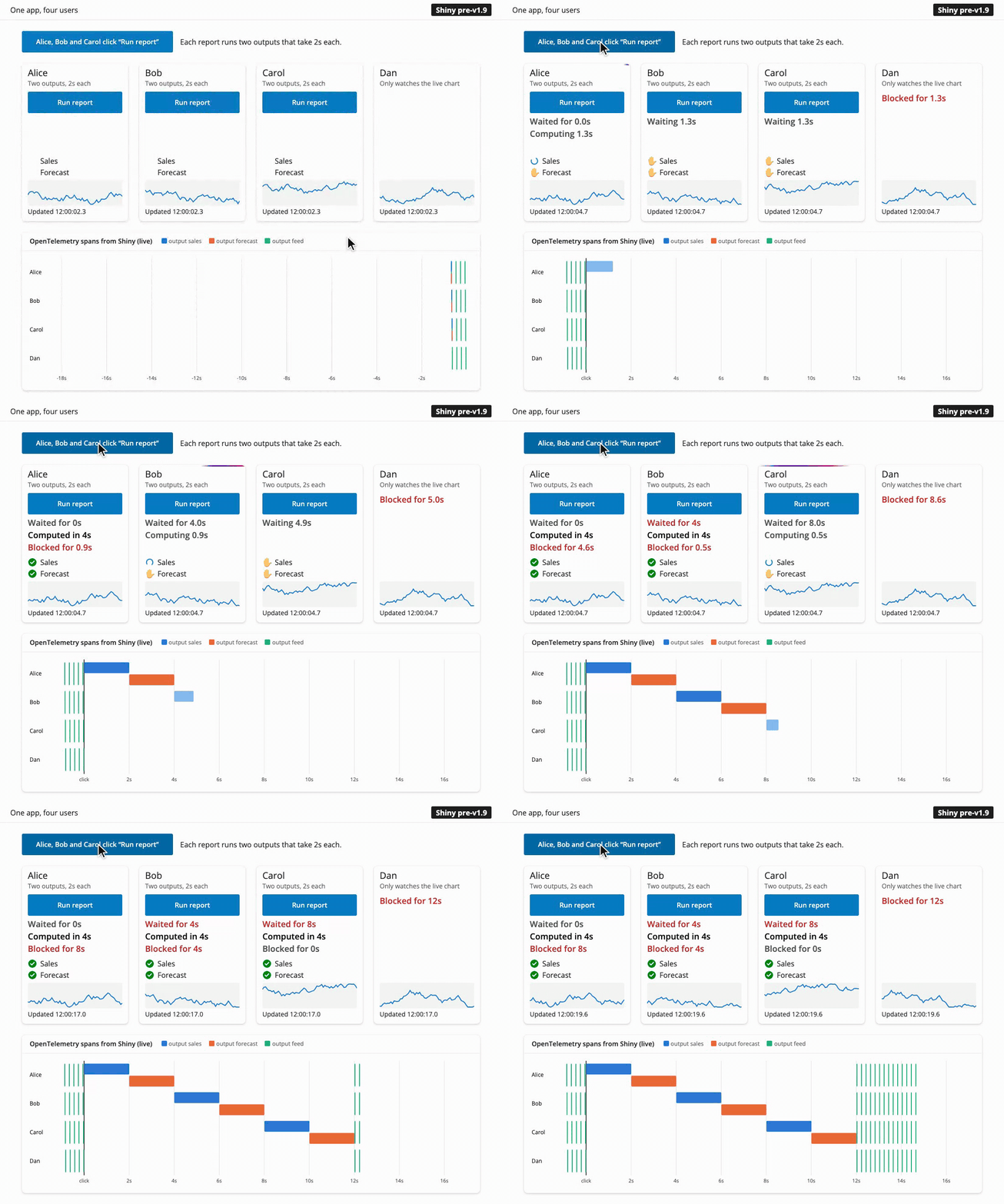
The recording below shows an example of how the new system improves things drastically. It simulates four people using the same app each in a separate Shiny session. Alice, Bob and Carol each click “Run report” at the same time. A report has two async outputs, “Sales” and “Forecast”, and each one takes two seconds to finish query. Dan only watches a chart that the server redraws every 0.2 seconds. The plot at the bottom displays the OpenTelemetry spans for the app to visualize the timeline of server processing.
Each user’s card shows the status of their two outputs: a hand while the output waits its turn, a spinner while it runs, and a check when it is done. Under the button, the time since the click is split into three parts that add up to the total: how long the report waited before its first output started, how long its outputs computed, and how long the session was blocked afterwards, before its chart could update again.
Before 1.9#
After 1.9#
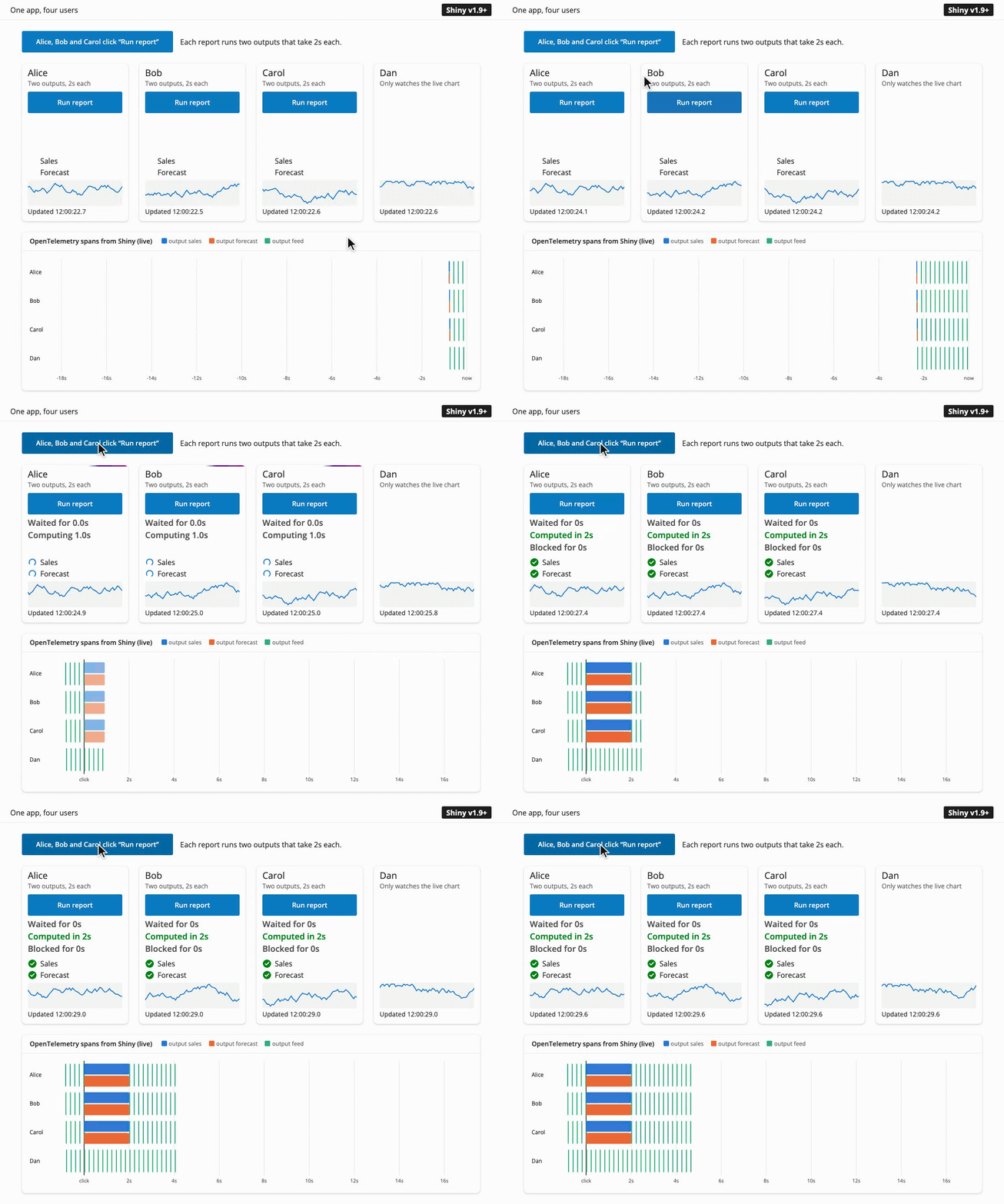
In 1.8, the OpenTelemetry data shows the six output spans forming a staircase. Alice’s “Forecast” waits for her own “Sales”, and Bob’s report can’t start until Alice’s ends. No session redraws its chart (the green ticks) until the last report is done. In 1.9, all six outputs run at the same time, and Dan’s chart never stops updating.
In 1.9, a reactive flush starts each invalidated effect as an asynchronous task and the reactive system doesn’t wait for it to finish to continue processing events. While Alice’s report awaits its query, the event loop is free to serve Bob, Carol, Dan, and everyone else.

The more users that click at the same time, the larger the difference:
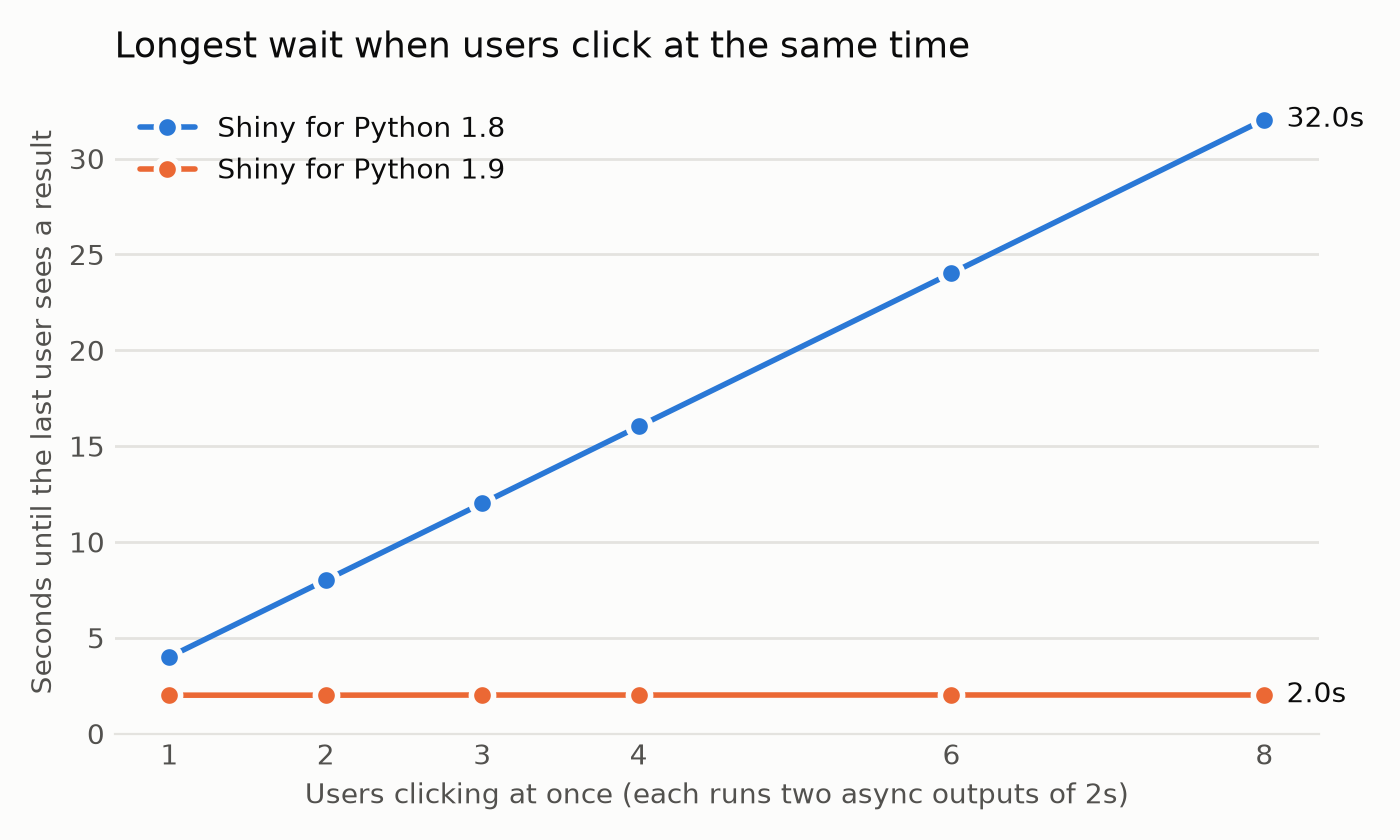
Put in terms of scaling: when n users each start k async outputs that each wait t seconds, the last user in 1.8 waits about n × k × t seconds, because every output runs after the one before it. In 1.9, every user waits about t seconds, for any number of users and outputs. The wait goes from $O(n \cdot k)$ to $O(1)$. In the chart, k is 2 and t is 2 seconds, so for 8 users the wait goes from 32 seconds to 2.
Caveat: this speedup applies when the slow part is waiting on something outside Python that can serve many requests at the same time, such as a database or a web API. Work that keeps Python itself busy will still add up (see Concurrency needs await below).
Async outputs run at the same time#
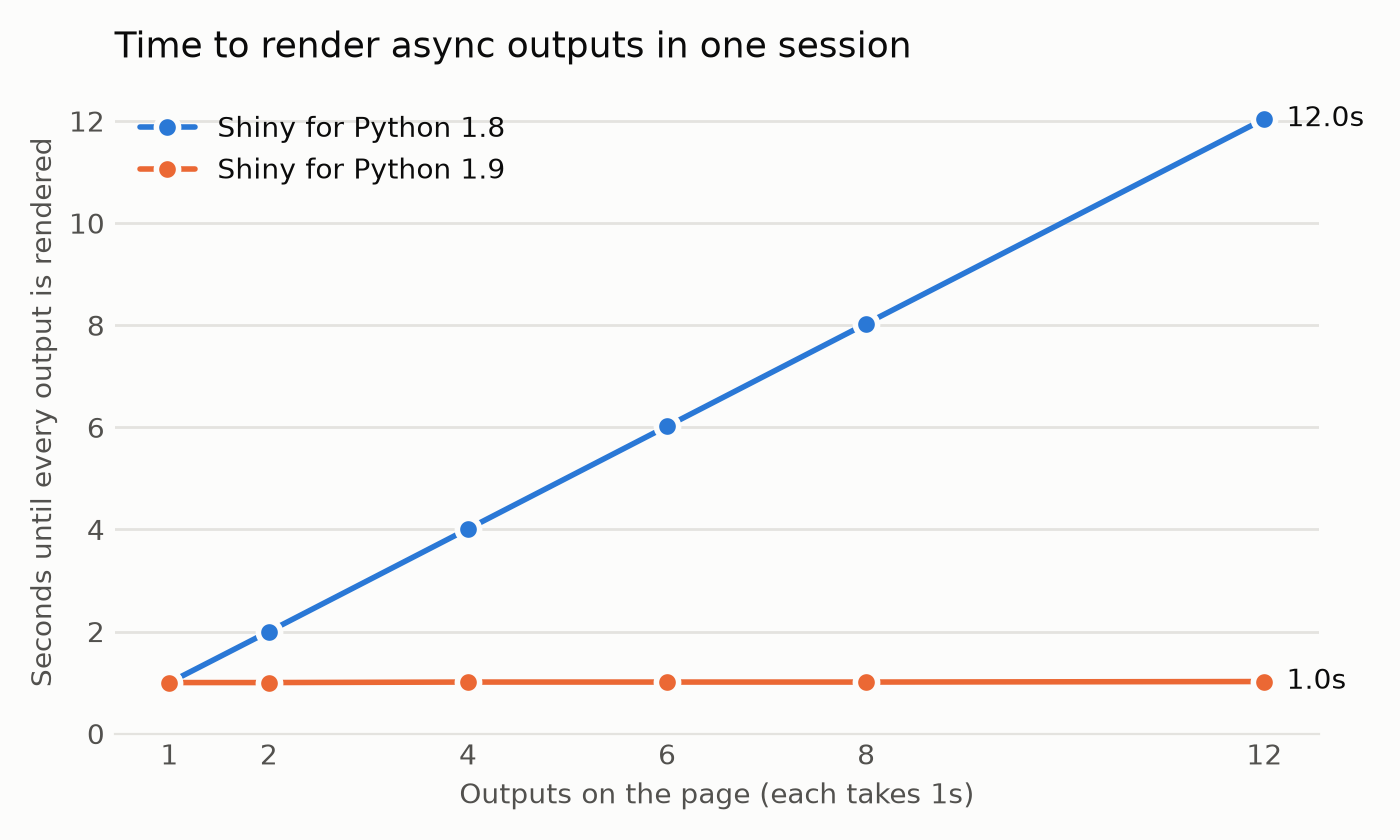
Apart from the cross-session benefits, the updated reactive system also improves things for a single user, as Alice’s two outputs show in the recording above. Before, a flush ran the outputs of a session one after another, so a page with several slow async outputs added up their times. Now they all start together and the page updates once all the updates are ready.
In this example, there are three outputs and each one waits for a one-second query. The app then shows how long after the click it was ready:
import asyncio
import time

from shiny import reactive
from shiny.express import input, render, ui

ui.input_action_button("refresh", "Refresh dashboard")


@reactive.calc
def refreshed_at():
    input.refresh()
    return time.perf_counter()


async def query(name: str) -> str:
    start = refreshed_at()
    await asyncio.sleep(1)  # Stands in for a one-second database query.
    return f"{name} ready after {time.perf_counter() - start:.1f}s"


@render.text
async def revenue():
    return await query("Revenue")


@render.text
async def signups():
    return await query("Signups")


@render.text
async def churn():
    return await query("Churn")
Open this app in Shinylive to run it in your browser and edit it.
In 1.8, the outputs are ready one at a time, after 1.0, 2.0 and 3.0 seconds, and none of them render until the last one is done at 3.0s. In 1.9, all three are ready after 1.0 second.
Concurrency needs await#
Shiny runs on a single asyncio event loop. Code can only run concurrently while other code awaits. A synchronous call such as time.sleep(), a blocking database driver, or a long calculation still stops every session until it returns, in both 1.8 and in 1.9.
The recommended way to run slow work is an extended task. It runs in the background, outside the session’s reactive cycle, so the user can keep using the app while it runs. It also gives you the task’s status, a way to cancel it, and a button that shows when the task is busy. Inside the task, call an async library, or run a blocking call in a thread with asyncio.to_thread():
@ui.bind_task_button(button_id="go")
@reactive.extended_task
async def run_query(filters):
    return await asyncio.to_thread(run_slow_query, filters)


@reactive.effect
@reactive.event(input.go)
def _():
    run_query(input.filters())


@render.data_frame
def results():
    return run_query.result()
For lower-level control, you can await asyncio.to_thread() directly in an output. This keeps the event loop free, so other sessions keep going, but it doesn’t have the extended task’s features: there is no status, no way to cancel, and the output is part of the session’s cycle, so the session sends its other outputs and applies its next input only after the call returns.
@render.data_frame
async def results():
    return await asyncio.to_thread(run_slow_query, input.filters())
What stays the same#
Within one session, Shiny keeps the guarantees that make reactive code easy to reason about. These match how Shiny works in R as well:
- Inputs don’t change in the middle of a cycle. If a user changes an input while the session’s effects are still running, Shiny applies the change only when all of them have finished. An effect that pauses at an
awaitsees the same input values when it resumes. Timers fromreactive.invalidate_later()wait the same way. - Outputs update together. A session sends all of its new output values at once, when its effects have finished, so the page never shows a mix of old and new results.
- An effect never overlaps itself. If an effect is invalidated while it runs, the next run starts when the current run ends.
Changes you might notice#
@schloerke, please review this section before we publish. It may be more detail than is needed, and I’m not 100% certain on the explanations and could use another set of eyes.
Most apps won’t need any changes, but here are some differences that you might see:
- Async effects interleave. Effects in the same session now run in turns at each
await, instead of one after another.prioritysets the order in which effects start, not the order in which they finish. If one effect depends on another effect’s side effect, use areactive.calcor areactive.valueto make the dependency explicit. (#837) - Destroying an effect cancels it. Because Shiny no longer waits for async effects to finish, a session can end, or a module can be destroyed, while one of its effects is paused at an
await. Soeffect.destroy(), the end of a session, andsession.destroy()for a module now cancel a run that is still in progress, by raisingasyncio.CancelledErrorat its currentawait. This stops the effect before it can read values that were destroyed with its module. If an effect needs to clean up, catchasyncio.CancelledError(or usetry/finally) and then let the error continue. - Message handlers run in their own tasks. In 1.8, Shiny ran a
session.set_message_handler()handler before it read the next message from the client, and it kept the global lock while the handler ran. So a slow handler delayed the client’s other messages, and every other session as well. Now each handler runs in a task of its own, and the session keeps handling messages while it runs. - Setting a value schedules a flush. Setting a
reactive.valuenow schedules a flush on its own (#21). So a value set from a download handler updates the outputs that read it right away, even while a streamed download is still sending (#1785). The reactive graph is still not thread-safe, so from another thread, useloop.call_soon_threadsafe(value.set, new_value). - Messages from
session.on_flushed()callbacks reach the browser. A callback that sends a message, for exampleui.update_text(), now has its message sent to the client (#1889). - OpenTelemetry spans follow the session. There is now one
reactive_updatespan for each session’s cycle, as in Shiny for R. It has the session’ssession.id, and the session’s calc, effect and output spans are its children.
reactive.lock() is deprecated#
Shiny itself no longer uses reactive.lock(), and in 1.9 it no longer does anything. Calling it emits a ShinyDeprecationWarning and returns a lock that never blocks. The reactive.lock() API will be completely removed in a future version of Shiny for Python.
The usual reason to use it was to change reactive state from a background task, followed by a flush. You can now just set the value directly, and Shiny will schedule the flush for you:
# Before
async with reactive.lock():
    latest.set(new_value)
    await reactive.flush()

# After
latest.set(new_value)
If your code used reactive.lock() to keep two pieces of your own code from running at the same time, create your own asyncio.Lock for that.
New: run_once_when_idle()#
This will need a link to the correct run_once_when_idle() docs once those are published.
Sometimes a change should wait until a session’s running effects have finished, the same way input changes from the browser do. session.run_once_when_idle() runs a function once, at the start of the session’s next cycle:
session.run_once_when_idle(lambda: latest.set(new_value))The function runs when all of the session’s effects have finished and its outputs have been sent. If the session is idle already, it runs on the next pass of the event loop.
Try it yourself#
The demo apps in this post, with the live OpenTelemetry timeline, are in . Run them with Shiny for Python 1.8 and 1.9 to see the difference on your own machine. To view the spans of your own app, see Shiny’s OpenTelemetry docs.
In closing#
This is one of the largest changes to Shiny for Python’s internals since its first release, and it brings Python and R to the same reactive model. The Shiny for Python 1.9 release post covers the rest of the release. If an app behaves differently after you upgrade, please let us know! As always, if you have questions or feedback, join us on Discord or open an issue on posit-dev/py-shiny. Happy Shiny-ing!